
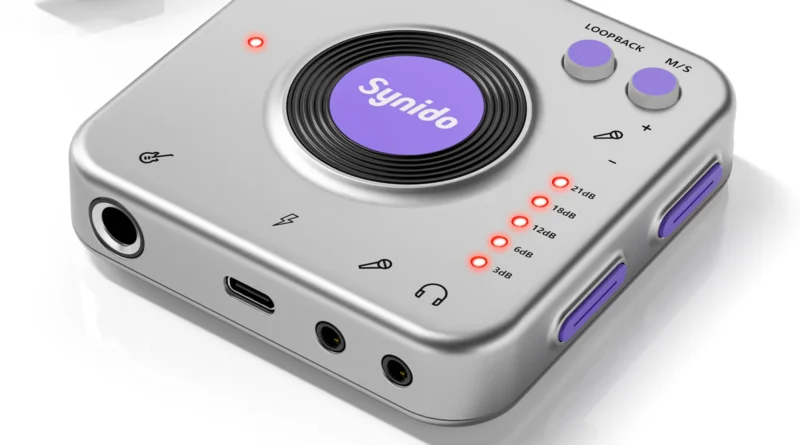
Synido Live Dock A20 Review: Portable Audio Interface for DJs and Live Streaming
Purchase Worldwide here
Purchase here in UK
Synido Live Dock A20 Review – Best Portable Audio Interface for DJs & Live Streaming?
Synido Live Dock A20 Review

A Portable Audio Interface for DJs, Live Streamers and Content Creators
Purchase here in UK
As DJing and content creation continue to evolve, more performers are turning to mobile livestreaming and portable recording setups. Whether you’re broadcasting a DJ set online, capturing audio at a wedding, or creating social media music content, having a compact and reliable audio interface can make a huge difference.
The Synido Live Dock A20 aims to solve this challenge by offering a portable, plug-and-play audio interface designed specifically for mobile creators, DJs and musicians.
In this in-depth review, we take a closer look at its design, sound quality, features and real-world use for DJs and live streamers.
Compact Design Built for Mobile DJs
One of the biggest selling points of the Synido Live Dock A20 is its ultra-portable design.
Unlike traditional desktop audio interfaces that can take up space in a studio or DJ booth, the A20 is designed to be small enough to carry in a pocket or DJ bag. This makes it ideal for:
-
Mobile DJs
-
Event videographers
-
Livestream content creators
-
Musicians recording on the go
The lightweight design means it can easily be integrated into mobile streaming setups using smartphones, tablets or laptops.
For DJs working in tight booth spaces or temporary setups at events and weddings, having a compact interface like this can simplify the entire recording or streaming workflow.
Audio Quality and Recording Performance
Despite its small size, the Synido Live Dock A20 delivers 24-bit / 96kHz audio recording, which is considered a professional digital audio standard.
This level of resolution allows for:
-
Clear and detailed sound reproduction
-
Improved dynamic range
-
Reduced digital noise compared to basic audio adapters
For DJs livestreaming their sets, this means audiences hear cleaner audio directly from the mixer rather than through a phone microphone.
Key Features for DJ Livestreaming
The Synido Live Dock A20 includes several features specifically useful for DJs and content creators.
Plug-and-Play Setup
One of the biggest advantages is its plug-and-play functionality. There is no need to install complicated drivers or software.
Simply connect the device via USB-C to a smartphone, tablet or laptop, and it is ready to record or stream audio.
This makes it perfect for DJs who want a fast setup for livestreaming on platforms like YouTube, Twitch or Mixcloud.
Real-Time Monitoring
The interface supports loopback monitoring, allowing users to listen to the incoming audio signal in real time.
This helps DJs and creators:
-
Monitor audio levels
-
Prevent distortion or clipping
-
Maintain consistent sound during a broadcast
Real-time monitoring is particularly helpful when streaming DJ sets where audio balance is critical.
Stream While Charging
A standout feature of the Synido Live Dock A20 is the ability to charge your smartphone while streaming audio.
This solves a major problem for many mobile creators — battery drain during long livestreams.
With pass-through charging, DJs can broadcast full sets without worrying about their phone dying mid-performance.
Real-World DJ and Streaming Use Cases
The Synido Live Dock A20 can be used in several practical situations for DJs and music creators.
DJ Livestreaming Setup
Connect the master output of your DJ mixer to the interface and stream directly to a smartphone.
This setup dramatically improves audio quality compared with using a phone microphone.
Wedding and Event Streaming
Event DJs and videographers can connect the output from a PA mixer to the A20 to capture clean event audio during livestreams.
This is ideal for:
-
Weddings
-
Conferences
-
Hybrid corporate events
-
Remote audience broadcasts
Social Media DJ Content
Many DJs now produce short mixes and clips for social media platforms.
The A20 allows creators to record direct audio into their phone while filming, ensuring much higher sound quality for content on platforms like Instagram, TikTok or YouTube.
Portable Instrument Recording
Musicians can also connect instruments such as guitars or keyboards using the adjustable gain control.
This makes the interface a useful mobile recording tool for producers working outside the studio.
Final Verdict: Is the Synido Live Dock A20 Worth It?
The Synido Live Dock A20 is designed for a specific audience: mobile DJs, livestreamers and content creators who need a portable audio interface.
While it won’t replace a full studio recording interface, it offers a convenient and affordable solution for capturing high-quality audio directly into smartphones or laptops.
For DJs streaming sets online, event professionals broadcasting weddings, or creators producing music content on social media, the A20 provides a simple and effective way to dramatically improve audio quality.
Best suited for:
-
Mobile DJs
-
Livestream DJs
-
Event videographers
-
Social media content creators
Purchase here in UK
Purchase Worldwide here
Discover more from
Subscribe to get the latest posts sent to your email.


